Postman
官方文档:https://learning.postman.com/docs/getting-started/introduction/

貌似首次登录,跳转 Web 注册,注册完再跳回 App 会出现一直 Loading 的问题,退出登录重新登录就好了。当然,不登录也可以使用。
变量 Variables
通过将值存储为变量,您可以在整个集合、环境、请求和脚本中引用它
变量范围(Scope)
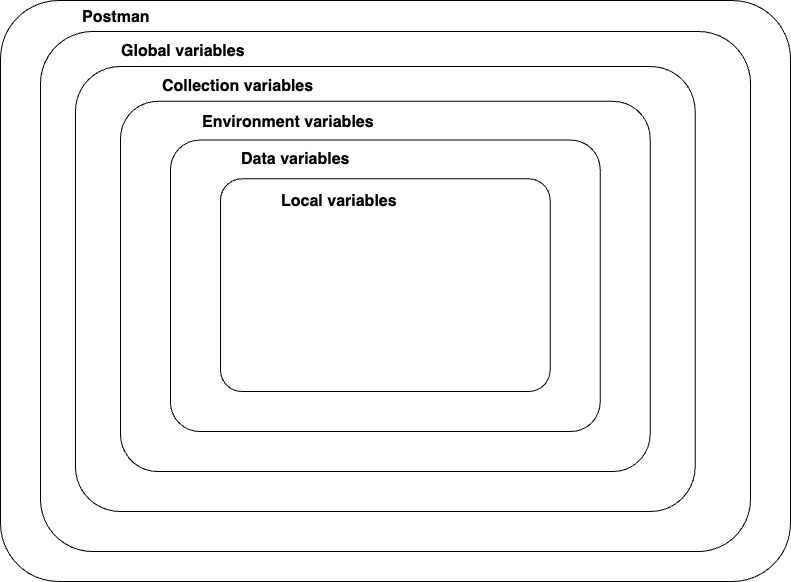
变量名重复时的优先级:从内到外
设置变量
- 设置入口
- 全局变量,通常在侧边栏 Environments 中,选择 Globals 后设置
- 集合变量,通常在侧边栏 Collections 中,进入某个集合页面,选择 Variables 选项卡后设置
- 环境变量,通常在侧边栏 Environments 中,Add a new variable 后设置
- 选择变量类型
- Default type 纯文本(默认)
- Secret type 加密
- 选择值类型
- Current value 本地变量(默认)
- Initial value 会同步到 Postman 服务器,与团队共享
引用变量
URL 中,比如:{{base_url}}
正文中,要放在双引号内:{"customer_id" : "{{cust_id}}"}
脚本中:pm.variables.get("variable_key");
预定义动态变量,比如:{{$timestamp}}
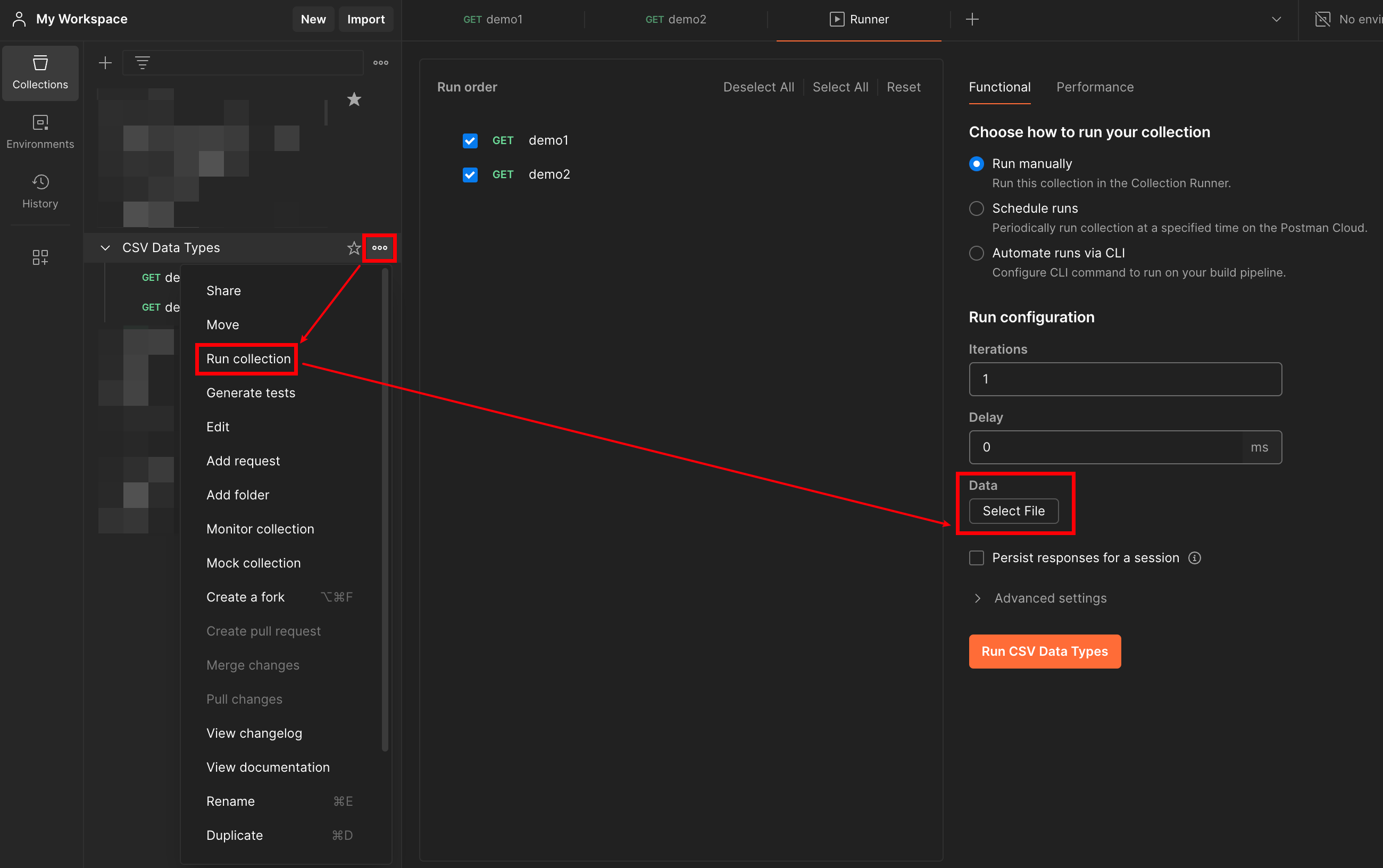
Data Variables
是从 csv 或 json 文件中读取
https://learning.postman.com/docs/collections/running-collections/working-with-data-files/
HTTP 请求

Params
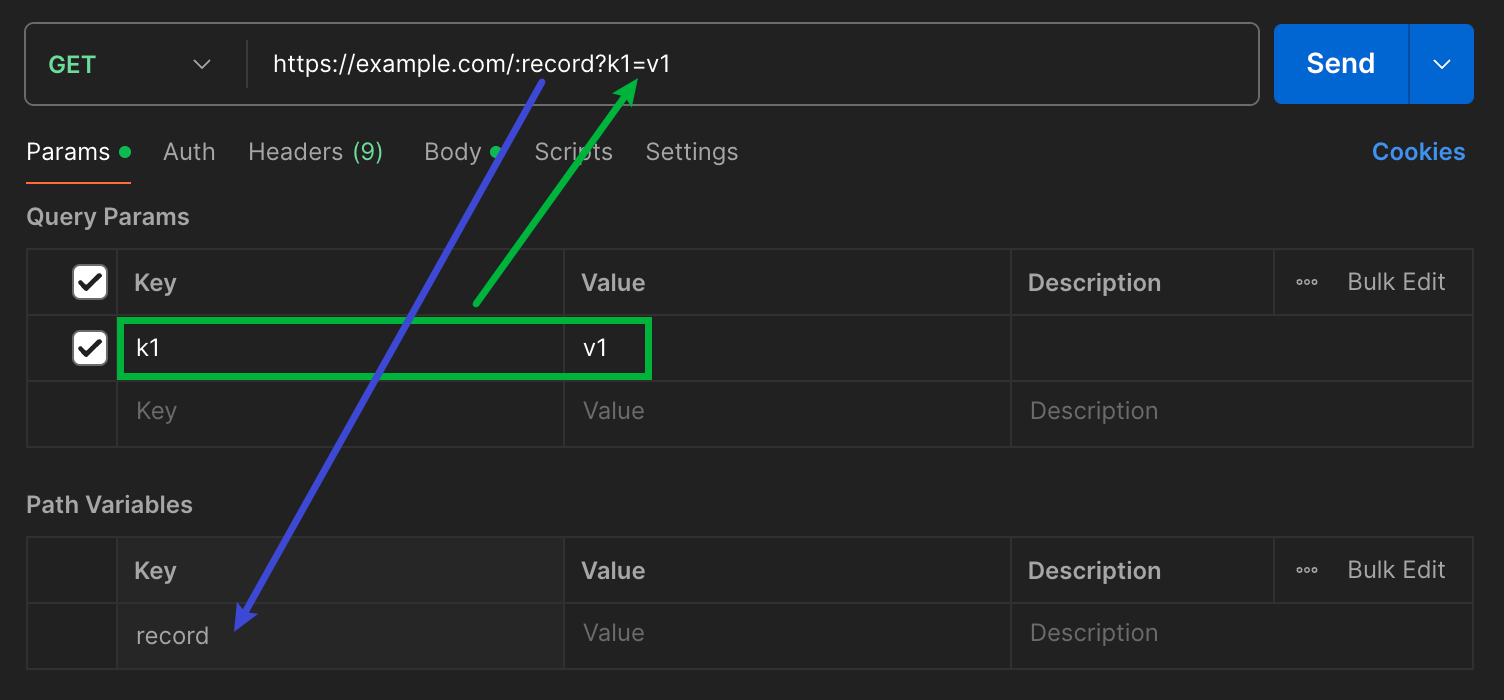
查询参数,会被附加到 URL 的尾部,位于 ? 后面,以键值对形式列出,用 & 分隔,比如 ?id=1&type=new
要指定路径参数,可以在 URL 框中以 :xx 的形式指定参数名
参数不会自动进行 URL 编码,选中变量后,弹出设置框,选择更多中的 EncodeURIComponent 对参数进行手动编码
Body
- raw
可以上传多种文本格式
Postman 会自动设置请求头的 Content-Type 为
Text: text/plain
HTML: text/html
JSON: application/json
XML: application/xml
JavaScript: application/javascript
- form-data
通常用于上传表单,并可以附加文件
Postman 会自动设置请求头为 Content-Type: multipart/form-data; boundary=<calculated when request is sent>,boundary 在在发送请求的时候自动计算出值
- x-www-form-urlencoded
Postman 会自动设置请求头为 Content-Type: application/x-www-form-urlencoded
- binary
可以使用二进制数据发送无法在 Postman 编辑器中手动输入的信息以及请求正文,例如图像、音频和视频文件等
Postman 会根据上传文件的不同类型,自动设置不同类型的 Content-Type 请求头
鉴权
https://learning.postman.com/docs/sending-requests/authorization/
Inherit auth from parent 默认继承自上层
API Key
Bearer Token, 比如 JWT
Basic Auth 用户名密码
Digest Auth Basic 的加强版
OAuth2.0
假设集合下所有请求头都需要添加相同的 xx-Token 字段,就可以选择 API Key,设置 key 和 value 到 Header
这里只是设置 Token,关于怎么获取 Token 是另一个问题。
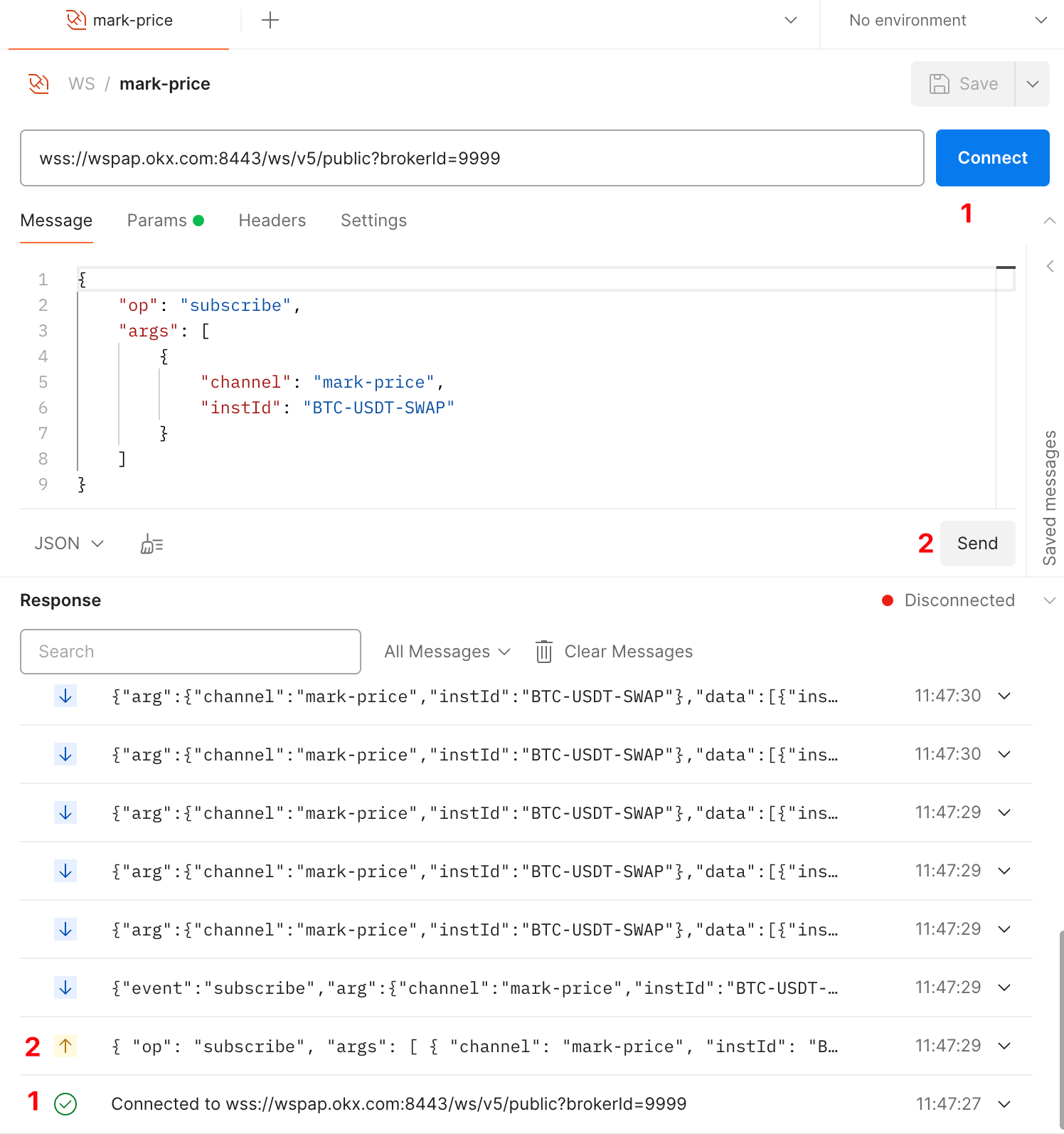
WS 请求
GraphQL 请求
https://learning.postman.com/docs/sending-requests/graphql/graphql-overview/
抓包
默认使用代理方式,还可以使用拦截器方式(需要单独安装 Chrome 插件)

抓取HTTPS协议接口,需要安装证书,在路径 ~/Library/Application Support/Postman/proxy 找到证书文件双击后信任
将浏览器或者设备代理到 5555 端口(我这里使用的是Chrome插件:SwitchyOmega)

捕获数据,默认不捕获返回信息,可以勾选,还可以筛选等

Newman
一个命令行工具,可以直接执行 Postman 导出的测试用例,然后再结合 Jenkins 就可以很方便地实现 API 测试与 CI/CD 流水线的集成。
newman run examples/sample-collection.json
脚本
https://learning.postman.com/docs/tests-and-scripts/write-scripts/intro-to-scripts/
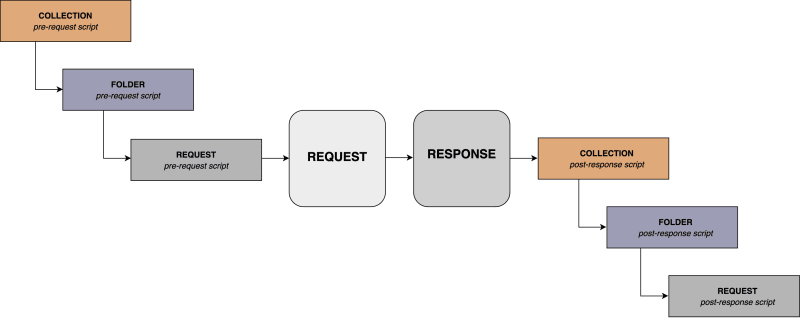
The Pre-request(预请求) and Post-response(响应后) tabs use the Postman Sandbox, a runtime based on Node.js that enables you to add dynamic behavior to requests and collections.
Post-response 内置了 Chai.js,可以使用动态变量,对响应数据进行测试断言,并在请求之间传递数据,输出会显示在 response 中的 Test Results tab
还可以在脚本中使用外部包:https://learning.postman.com/docs/tests-and-scripts/write-scripts/postman-sandbox-reference/pm-require/
pm.test("Status test", function () {
    pm.response.to.have.status(200);
});

pm.test("environment to be production", function () {
    pm.expect(pm.environment.get("env")).to.equal("production");
});